


 LED Grow Lights
 Apollo
 Apollo Original Series
 Apollo Falcon Series
 Apollo X-Series
 Lumatek
 Lumatek ATS Pro Series
 Lumatek Zeus Pro Series
 Lumatek VF Series
 Mars Hydro
 Mars Hydro TS-Serie
 Mars Hydro FC-EVO
 Mars Hydro FC-E Serie
 Mars Hydro SP Series
 Spectrabox
 Spectrabox UFO Series
 Spectrabox XTR Series
 Spectrabox Drone
 Spider Farmer
 Spider Farmer SF-Series
 Spider Farmer SE-Series
 Spider Farmer G-Series
 Spider Farmer Supplemental
 Fluence
 Migro
Migro
 Moeslamp
 KIND LED
 Mother
 Sanlight
 Spectro Light
 Secret Jardin
 Telos LED
 The Jungle
 Viparspectra
 E27 LED Grow Lights
 LED Grow Panel
 LED Grow Strips
 Bilberry
 LED Light Sources
 LED lamps
 E14 LED bulbs
 E14 Filament
 E14 Dimmable Lamps
 E14 Smart Lamps
 E14 Decorative Lamps
 E14 Warm White (3000K)
 E27 LED lamps
 E27 Filament
 E27 Dimmable Lamps
 E27 Smart Light Bulbs
 E27 Decorative Lamps
 E27 Warm White (3000K)
 E27 Neutral White (4000K)
 E27 Cool White (6000K)
 G4 LED bulbs
 G9 LED bulbs
 R7S LED bulbs
 LED Spots
 LED spots GU10
 Smart LED Spots
 Dimmable LED Spotlights
 Recessed LED spotlights
 LED Surface Mount Spotlights
 LED Fluorescent Tubes
 LED TL T5
 LED TL T8
 60 cm
60 cm
 90 cm
90 cm
 120 cm
 150 cm
 LED TL 3000K
 LED TL 4000K
 LED TL 6000K
 LED strips
 LED Strip Warm White 3000K
 LED Strip Bright White 4000K
 LED Strip Cool White 6000K
 LED Strip RGB
 Smart LED Strips
 LED strip accessories
 Decorative lamps
 Amber Lamps
 Smoke Lamps
 LED Filament
 Globe Lamps
 Edison Lamps
 Indoor LED Lighting
 LED Panels
 LED Panel 30x30 cm
 LED Panel 30x60 cm
 LED Panel 60x60 cm
 LED Panel 62x62 cm
 LED Panel 30x120 cm
 LED Panel 60x120 cm
 LED Panel 30x150 cm
 3000K (Kelvin)
 LED Panel 4000K (Kelvin)
 LED Panel 6000K (Kelvin)
 LED Downlights
 LED Downlights Round
 LED Downlights Recessed
 LED Downlights Dimmable
 LED Downlights Surface Mounted
 LED Downlights Square
 LED Railspots
 1-phase LED track spotlights
 3-phase LED track spotlights
 GU10 track spotlights
 Black LED track spotlights
 White LED track spotlights
 Rail spotlights Accessories
 LED ceiling lights
 Dimmable LED ceiling lights
 LED ceiling lights with sensor
 LED ceiling lights with fan
 Round LED ceiling lights
 Square LED ceiling lights
 LED Wall Lights
 LED Wall Lights Up & Down
 LED Wall Lights Sensor
 LED Wall Lights Spot
 LED Wall Lights Dimmable
 LED Wall Lights Design
 Recessed LED wall lights
 LED Floor Lamps
 LED Uplights
 LED Tripod Floor Lamps
 LED Arc Lamps
 LED Design Floor Lamps
 Industrial LED Floor Lamps
 LED Table Lamps
 Rechargeable LED table lamps
 LED table lamps design
 LED table lamps, dimmable
 LED table lamps with sensor
 LED Mirrors
 LED Mirror Lights
 LED bathroom mirrors
 Round LED mirrors
 LED makeup mirrors
 LED mirror cabinets
 LED Hanging lamps
 LED pendant lights E27
 LED pendant lights E14
 LED pendant lights, dimmable
 LED hanglampen design
 Industrial LED pendant lights
 LED high-bays
 LED High Bays 4000K
 LED High Bays 6000K
 Lineaire LED High Bays
 UFO LED High Bays
 LED Fluorescent Luminaires
 LED wireless lighting
 Outdoor LED Lighting
 LED Floodlights
 Garden lighting
 LED Construction Lights
 Street lighting
 LED Sports Field Lighting
 Outdoor Table Lamps
 Light poles
 Outdoor Spike Spotlights
 LED Ground Spotlights
 Outdoor Wall Lamps
 House Number Lighting
 Smart Home
 Smart LED Lighting
 Smart Climate Control
 Smart Thermostats
 Smart Radiator Thermostats
 Smart Energy Monitoring
 Humidifiers & Aroma Diffusers
 Smart Security
 Smart Security Cameras
 Smart Video Doorbells
 Smart Alarm Systems
 SOS buttons & watches
 Smoke, Fire and Gas Detectors
 Smart Home Sensors
 Temperature & Hygrometer Sensors
 Air Quality Monitors
 Motion Sensors (PIR)
 Smart Accessories
 Smart Power Plugs
 Smart Built-In Switches
 Wireless Smart Switches
 Smart Remote Controls
 Smart Gateways
 Commercial LED Lighting
 Lighting By Room
 Living room
 Pendant lamps
 Ceiling lights
 Floor lamps
 Table lamps
 Wall lights
 Bedroom
 Night lights
 Wall Lamps
 Ceiling lights
 Floor lamps
 Bathroom
 Bathroom ceiling lights
 Mirror lighting
 Spots (IP rating suitable)
 LED Mirror Cabinets
 Kitchen
 Ceiling lights
 Pendant lamps
 Spotlights / recessed spotlights
 Kitchen cabinet lighting
 Dining room
 Pendant lamps
 Ceiling lights
 Rail spotlights
 Floor lamps
 Hallway & Corridor
 Children's room
 LED Accessories
 Lampholders & fittings
 GU10 fittings
 E27 fittings
 E14 fittings
 G9 fittings
 Switching equipment
 Light switches
 LED dimmers
 Sockets & cover plates
 Outdoor switches
 Installation cable & wire
 Flexible conduit with wire
 YMVK installation cable
 VD installation wire
 VMVL cables
 Solar cables
 SIHF silicone cables
 Cables & extension leads
 Power cables
 Power cables
 Extension leads
 Cable reels
 Network cables
 Connection materials
 Terminal blocks
 Cable connectors
 Insulation tape
 Cable ties
 Sensors & switching
 Timer switch
 Motion sensors
 Dusk-to-dawn switches
 Installation accessories
 Junction boxes & wall boxes
 Cable trunking
 Mounting hardware
 LED drivers & power supply
 LED drivers
 LED transformers
 Panels & mounting
 LED panel surface frames
 LED panel suspension kits
 Other accessories
 Home Batteries & Power Stations
 E27 festoon cables
 Floodlight accessories
 Red Light Therapy
 Method Seven

Smart Gateways
Smart Zigbee gateways
A smart gateway (also called a hub/bridge) is the heart of your Smart Home when you use Zigbee. Instead of connecting every device directly to WiFi, you pair sensors, switches and other Zigbee devices to one central gateway. This keeps your network calm, makes automations more reliable, and ensures your Smart Home stays scalable: you can start small and expand later without your system becoming unstable. In this category you’ll find Zigbee 3.0 gateways focused on broad compatibility and easy management from a single app environment (model-dependent).
Why a Zigbee gateway often works better than “everything on WiFi”
Zigbee is designed for smart devices that send small amounts of data but must always be ready—think sensors, radiator valves and wireless switches. With a gateway, you create a central layer where all these devices come together. That makes scenarios like “motion = lights on”, “window open = heating down” or “night mode = everything off” far more consistent. In many cases, you also avoid juggling multiple apps: the gateway brings your devices together so you can build one clear structure with scenes, schedules and notifications.
What you’ll find in this category
This page currently shows 3 gateways from Smartlife Domotica. For example, there is a Zigbee Gateway 3.0 listing support for HomeKit, Google and Alexa and connectivity via WiFi 2.4GHz + Zigbee. There is also a plug-in Zigbee Gateway 3.0 (socket installation) using the Tuya app, plus a variant that explicitly mentions pairing up to 100 devices via Smart Life and WiFi 2.4GHz (availability/specs may differ per model).
Buying guide: which smart gateway fits your setup?
1) Ecosystem: Tuya/Smart Life or HomeKit
First decide where you want to manage your Smart Home. If you already use Tuya / Smart Life, a gateway inside that ecosystem is usually the most logical choice. If you use Apple’s ecosystem (HomeKit) or want to grow into it, choose a gateway that explicitly supports it. That way you avoid re-pairing devices later or running into platform limitations for automations.
2) Installation: plug-in or place anywhere
If you want the simplest setup, a plug-in gateway is ideal: plug it into a socket, pair it, and you’re done. Placement matters—position the gateway centrally in your home for the best reach to sensors and switches. In larger homes, a central location can be the difference between “always works” and “sometimes drops out”.
3) Scalability: how many devices do you want to connect?
If you’re starting with just a few devices, almost any gateway will do. But if you want to grow into a full Smart Home with lots of sensors, switches and climate devices, pay attention to capacity. One model in this category, for example, mentions support for up to 100 devices. That becomes especially relevant once you add more rooms, zones and automations.
Expand logically from your gateway (max. 5 internal links)
A gateway becomes truly valuable when you combine it with the right building blocks. Start at Smart Home and then expand with: smart sensors (automation triggers), smart climate control (comfort and savings), smart security (alerts and peace of mind) and the full overview of smart accessories.
Buy a smart gateway: the right foundation for a reliable Smart Home
With a good Zigbee gateway, you lay the foundation for a Smart Home that stays stable, expandable and easy to manage. Choose the platform that fits your ecosystem, place the gateway centrally for the best range, and keep an eye on device capacity if you plan to grow. That way you build a setup that’s not only smart, but also dependable—day after day.
Uitgelichte merken voor Smart Gateways
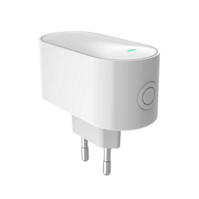
• Protocol: Zigbee 3.0 • Installatie: Plug-in (stopcontact) • Draadloos: Wi‑Fi 2.4 GHz
• Protocol: Zigbee 3.0 • Installatie: Plug-in (stopcontact) • Draadloos: Wi‑Fi 2.4 GHz
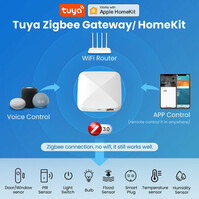
• Protocol: Zigbee 3.0 • Compatibiliteit: HomeKit, Google, Alexa • Connectiviteit: WiFi 2.4GHz + Zigbee
• Protocol: Zigbee 3.0 • Compatibiliteit: HomeKit, Google, Alexa • Connectiviteit: WiFi 2.4GHz + Zigbee
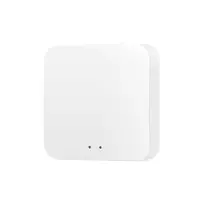
• Protocol: Zigbee 3.0 • Capaciteit: Tot 100 apparaten • Connectiviteit: WiFi 2.4GHz
• Protocol: Zigbee 3.0 • Capaciteit: Tot 100 apparaten • Connectiviteit: WiFi 2.4GHz
Smart Zigbee gateways
A smart gateway (also called a hub/bridge) is the heart of your Smart Home when you use Zigbee. Instead of connecting every device directly to WiFi, you pair sensors, switches and other Zigbee devices to one central gateway. This keeps your network calm, makes automations more reliable, and ensures your Smart Home stays scalable: you can start small and expand later without your system becoming unstable. In this category you’ll find Zigbee 3.0 gateways focused on broad compatibility and easy management from a single app environment (model-dependent).
Why a Zigbee gateway often works better than “everything on WiFi”
Zigbee is designed for smart devices that send small amounts of data but must always be ready—think sensors, radiator valves and wireless switches. With a gateway, you create a central layer where all these devices come together. That makes scenarios like “motion = lights on”, “window open = heating down” or “night mode = everything off” far more consistent. In many cases, you also avoid juggling multiple apps: the gateway brings your devices together so you can build one clear structure with scenes, schedules and notifications.
What you’ll find in this category
This page currently shows 3 gateways from Smartlife Domotica. For example, there is a Zigbee Gateway 3.0 listing support for HomeKit, Google and Alexa and connectivity via WiFi 2.4GHz + Zigbee. There is also a plug-in Zigbee Gateway 3.0 (socket installation) using the Tuya app, plus a variant that explicitly mentions pairing up to 100 devices via Smart Life and WiFi 2.4GHz (availability/specs may differ per model).
Buying guide: which smart gateway fits your setup?
1) Ecosystem: Tuya/Smart Life or HomeKit
First decide where you want to manage your Smart Home. If you already use Tuya / Smart Life, a gateway inside that ecosystem is usually the most logical choice. If you use Apple’s ecosystem (HomeKit) or want to grow into it, choose a gateway that explicitly supports it. That way you avoid re-pairing devices later or running into platform limitations for automations.
2) Installation: plug-in or place anywhere
If you want the simplest setup, a plug-in gateway is ideal: plug it into a socket, pair it, and you’re done. Placement matters—position the gateway centrally in your home for the best reach to sensors and switches. In larger homes, a central location can be the difference between “always works” and “sometimes drops out”.
3) Scalability: how many devices do you want to connect?
If you’re starting with just a few devices, almost any gateway will do. But if you want to grow into a full Smart Home with lots of sensors, switches and climate devices, pay attention to capacity. One model in this category, for example, mentions support for up to 100 devices. That becomes especially relevant once you add more rooms, zones and automations.
Expand logically from your gateway (max. 5 internal links)
A gateway becomes truly valuable when you combine it with the right building blocks. Start at Smart Home and then expand with: smart sensors (automation triggers), smart climate control (comfort and savings), smart security (alerts and peace of mind) and the full overview of smart accessories.
Buy a smart gateway: the right foundation for a reliable Smart Home
With a good Zigbee gateway, you lay the foundation for a Smart Home that stays stable, expandable and easy to manage. Choose the platform that fits your ecosystem, place the gateway centrally for the best range, and keep an eye on device capacity if you plan to grow. That way you build a setup that’s not only smart, but also dependable—day after day.
